
为什么要改 DNS
默认 DNS 由运营商分配,可能慢、不稳定或被劫持。换成公共 DNS 能提速、增强抗污染能力。
常用公共 DNS:
- 阿里
223.5.5.5/223.6.6.6 - 腾讯
119.29.29.29 - Google
8.8.8.8/8.8.4.4 - Cloudflare
1.1.1.1
图形界面(Win10 / Win11 通用)
- 打开设置 → 网络和 Internet → 以太网(或 WLAN)。
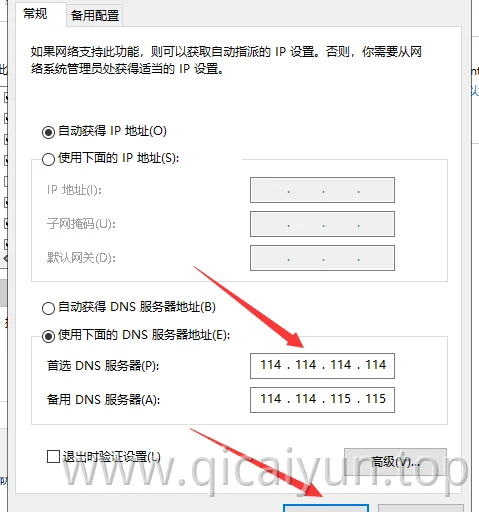
- 点击当前连接 → 更多适配选项 / 硬件属性 → 找到 DNS 服务器分配,点编辑。
- 把”自动(DHCP)”改为手动,开启 IPv4,填入首选/备用 DNS(如
223.5.5.5和119.29.29.29),保存。 - 断开重连网络生效。
命令行(管理员)
# 查看网卡名称
netsh interface show interface
# 设置 DNS(把"以太网"换成你的网卡名)
netsh interface ip set dns name="以太网" static 223.5.5.5
netsh interface ip add dns name="以太网" 119.29.29.29 index=2
PowerShell 等价写法:
Set-DnsClientServerAddress -InterfaceAlias "以太网" -ServerAddresses ("223.5.5.5","119.29.29.29")验证
命令提示符执行 nslookup www.baidu.com,看返回的 Server 是否变成你设置的 DNS 。
最后更新:2026-09,适用于 Windows 10 / 11 。